Save Page as PDF to Drive
A free browser extension from Desktora. It saves the page you are on, even receipts, order confirmations and pages behind a login, as a searchable PDF or a full-page screenshot, to Google Drive or your computer.
Free · Works in Chrome, Edge, Brave, Opera and Vivaldi
What it does
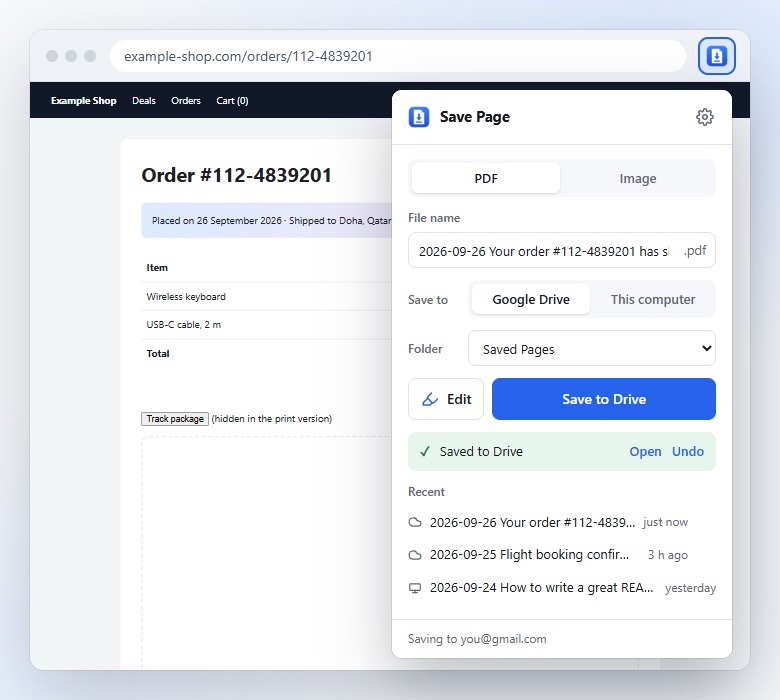
- Real PDFs, not pictures of text: made with the browser’s own print engine, so the text stays sharp and Google Drive can search inside it.
- Full-page screenshots as PNG or JPG, even of mail, chat and dashboard pages that scroll inside a panel. Or just the part on your screen.
- Google Drive or your computer: pick a Drive folder (or make one, like “Receipts”), or save straight to your Downloads folder with no account at all.
- Clean it up first: Simple view keeps just the article, without ads, menus and pop-ups. Remove any part with a click, change the text size, and highlight what matters.
- Right-click an image or a link (like a PDF) to send that file to your Drive.
- Clear file names such as “2026-09-26 Order confirmation.pdf”, and Undo moves a Drive save to the trash if it came out wrong.
- One click on the toolbar icon, the right-click menu, or Alt+Shift+S.
Why an extension, not a Desktora tool?
Desktora’s tools work on files you give them. Saving a web page is different: the page you want is often a receipt, a booking or an order that only shows up when you are signed in to that site. A website can’t see other websites, but an extension can save the page that is already open in your browser, exactly as you see it.
How it works
- Click the extension’s icon on any page.
- Choose PDF or Image, and Google Drive or This computer. Drive asks you to sign in with Google once.
- Click Save, or click Edit first to clean up the page or highlight what matters.
Private by design
- Pages go straight from your browser to your own Google Drive or computer. Nothing passes through Desktora’s servers.
- It uses Google’s most limited Drive permission, so it can only see the files it saves, never the rest of your Drive.
- No ads, no tracking, no analytics.
Good to know
While saving, Chrome briefly shows a bar saying the extension “started debugging this browser”. That is how extensions use Chrome’s built-in print engine, and the bar closes by itself when the save is done.
Simple view uses Mozilla’s Readability (Apache License 2.0). Not affiliated with Google or Mozilla. Google Drive and Chrome are trademarks of Google LLC.